AI drafting software that drafts the floor plan with you
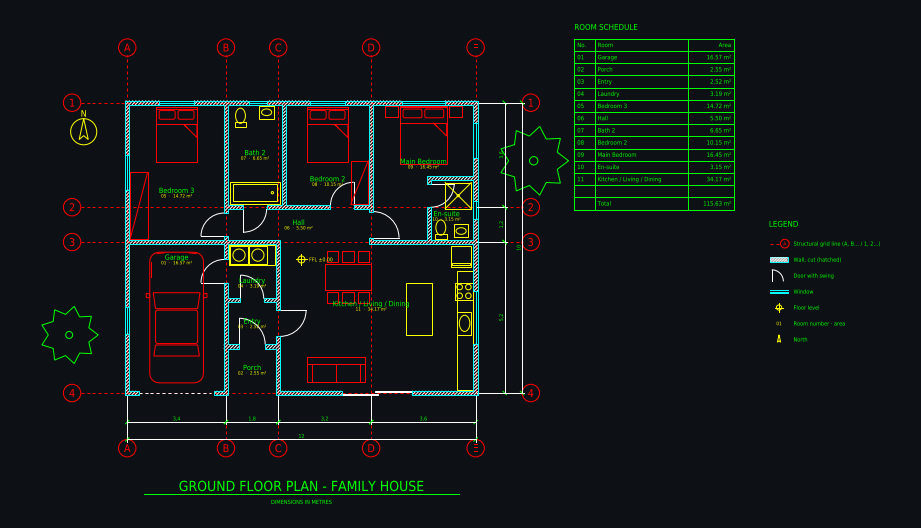
Plan Chat is an AI drafter for architectural floor plans. Give it a brief, a field sketch, a photo, a scan or a PDF; it lays out a grid and draws walls, doors, windows, fixtures, dimension chains, room tags and a room schedule on standard layers, live, while you watch. Then you correct it by chat or with the built-in CAD tools and export DWG, DXF or a plotted PDF.
Some new accounts get their first drawing free while we test it.
How it works
1. Hand over the job
Type the program or upload what the client sent you: a sketch with measurements, a photo of an old plan, a scan or a PDF.
2. It drafts, you review
The drafter states its assumptions (grid, sizes, wall types), draws the plan step by step, and checks its own result against the input.
3. Finish and deliver
Fix details by chat or with the CAD tools, then send the client a PDF sheet or continue in your own CAD program with the DWG/DXF.
Real drawings: ai drafting software in practice
All community drawings → L-shaped backyard cottage (ADU) 10 × 9 m: 2 bedrooms, covered patioFrom a written brief · 1 min · DXF
 Narrow townhouse on a 5 m wide lot: 3 bedrooms, 2 courtyardsFrom a written brief · 1 min · DXF
 Guitar-shaped house, 26 m long, with music studio in the headstockFrom a written brief · 2 min · DXF
 Honeycomb house: seven hexagonal rooms, 5 m eachFrom a written brief · 1 min · DXF
 Castle home 14 × 14 m with four round corner towersFrom a written brief · 1 min · DXF
 Submarine tiny home: 20 × 5 m hull with rounded endsFrom a written brief · 1 min · DXF
For drafters with a backlog
Use it for the redraw and first-layout work, the part of a job that is mostly re-entering what already exists on paper.
Office standards
Tell it your wall thicknesses, units and layer expectations once per drawing; the output uses A-WALL / A-DOOR / A-GLAZ / A-ANNO naming.
Every version kept
Each change is a version with its own link, so you can show the client options or go back without redrawing.
What you get
| DXF | Layered, opens in AutoCAD, BricsCAD, DraftSight, LibreCAD, QCAD, Rhino, SketchUp (import) and Revit (link). |
|---|---|
| DWG | AutoCAD 2010 format, so every AutoCAD from 2010 on and most DWG-compatible programs open it. |
| A3 landscape sheet plotted to a true scale (1:50, 1:100 …) with a border and a title block. |
Plus a 3D model built from the same walls and openings, photoreal renders of any version, and every version kept with its own link.
Layers in the drawing
| A-WALL | walls, with A-WALL-PATT for the cut hatch |
|---|---|
| A-DOOR / A-GLAZ | doors with swings, windows |
| A-GRID | structural grid with bubbles (A, B, C … / 1, 2, 3 …) |
| A-ANNO-DIMS | dimension chains, overall and per bay |
| A-ANNO-TEXT | room names, numbers and areas, room schedule |
| A-FURN / A-FLOR-FIXT | furniture, kitchen and bathroom fixtures |
| A-FLOR-STRS / A-SITE / A-PLNT | stairs, site elements, trees |
Tips for the best result
- Field sketches: write the overall dimensions and each room size on the sketch.
- Ask for the room schedule and areas in the unit your client uses.
- For a set with several floors, draft one floor per drawing.
- Use the PDF sheet for quick client approvals, the DWG for permit work by the licensed professional.
Questions
Is there AI drafting software for architectural floor plans?
Yes. Plan Chat is an AI drafter that draws floor plans as real CAD (layered DWG and DXF, plus a scaled PDF) from a brief, a sketch, a photo, a scan or a PDF, and lets you edit the result by chat or with CAD tools.
Does it do construction drafting?
It drafts architectural floor plans: walls, openings, dimensions, room schedule, on standard layers. Construction drafting beyond the plan (wall sections, details, structural, MEP sheets) stays with a drafter or engineer; the DWG gives them a clean base to start from.
Will AI replace CAD drafters?
Not for the work that needs judgment, code knowledge and responsibility. It does take over a lot of redraw and first-layout time, which is why drafters use it to turn jobs around faster.
Can I use it instead of a CAD drafting service?
For a clean floor plan from a sketch, a scan or a description, often yes, in minutes instead of days. For permit sets, elevations, sections, structural or MEP drawings, you still need a professional drafter or architect.
Which file formats do I get?
DWG (AutoCAD 2010), layered DXF, and an A3 PDF at a true scale with a title block. A 3D model and photoreal renders come from the same drawing.
What does it cost?
It is paid from AI Architectures credits, plans from $12 a month (Team plans for offices). A new drawing usually uses 700 to 1,800 credits, a change 60 to 600.
Try it with your own plan
Drawings, changes and renders use credits from an AI Architectures plan, from $12 a month; DXF, DWG and PDF downloads are included. See pricing.
Open the CAD studioMore ways to use Plan Chat
- Sketch to CAD: turn a hand-drawn floor plan into a DXF / DWG with AI
- Floor plan image to DXF: convert a JPG, PNG or photo of a plan to CAD
- Convert a floor plan to DWG for AutoCAD with AI (from an image, sketch or description)
- AI CAD floor plan generator: dimensioned floor plans in DXF and DWG
- AI construction drawings: floor plans as DWG, DXF and PDF from a sketch, photo or PDF
- AI blueprint generator: house blueprints as real CAD from text, a sketch or an image
- Blueprint maker: draw house blueprints online with AI (DWG, DXF, PDF)
- Blueprint of my house: how to find it, or redraw it from a photo or sketch with AI
- Text to CAD floor plan: describe a building, get a DXF drawing
- 2D floor plan maker with AI: dimensioned 2D plans as CAD (DXF, DWG, PDF)
- PDF to DWG with AI: convert a PDF floor plan to a layered AutoCAD drawing
- Scan to CAD: convert scanned floor plans and paper drawings to DWG / DXF with AI
- Image to DWG: convert a JPG or PNG floor plan to AutoCAD with AI
- AutoCAD AI: an AI drafter that draws floor plans for AutoCAD (DWG)
- As-built floor plans from a field sketch: measured sketch to CAD (DWG, DXF, PDF)
- Home addition design with AI: plan the addition on your existing floor plan (DWG, PDF)
- ADU design with AI: a custom ADU floor plan for your lot, drawn as CAD (PDF, DWG)
- Start from a measured house plan (ADU, ranch, farmhouse, two-story)
- Desktop app for Windows, Mac and Linux
AI concept drawings can contain mistakes: check dimensions and have a licensed architect or engineer review a plan before you build or apply for a permit. Plan Chat is part of AI Architectures by 20Vision: 500,000+ hours of drafting, modelling & rendering saved, 280 years of full-time work our users got back, across 80,000+ designs.