Sketch to CAD: your hand-drawn floor plan as a real CAD drawing
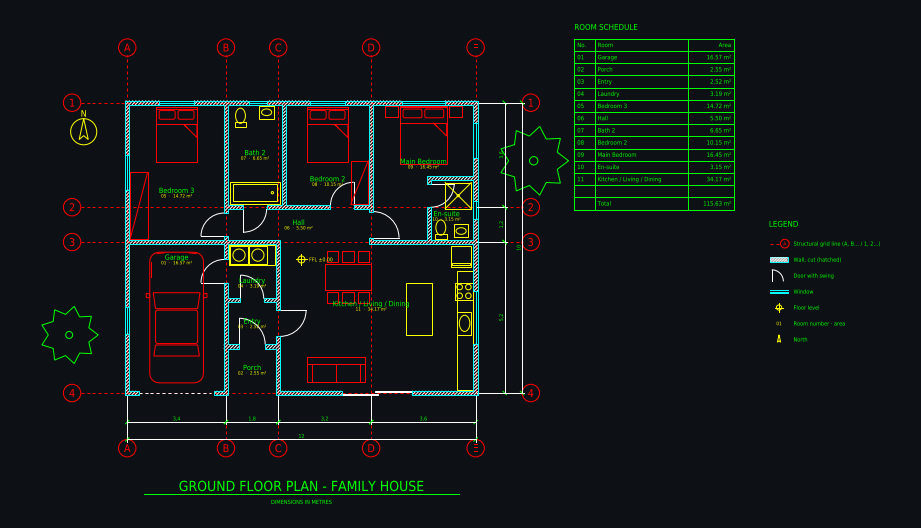
Take a photo of a sketch on paper, a napkin drawing or a whiteboard, and an AI drafter redraws it in front of you as a layered CAD floor plan: walls with thickness, doors with swings, windows, a structural grid, dimension chains, room names and areas. Then edit it like any CAD file and download DXF, DWG or PDF.
Some new accounts get their first drawing free while we test it.
How it works
1. Photograph the sketch
A phone photo is enough. Write the main dimensions on the sketch if you know them (overall length and width, a room or two); otherwise the drafter infers sizes from typical doors, beds and stairs.
2. Watch it being drafted
The drafter reads the sketch, states the grid and room sizes it will use, then draws walls, openings, furniture, dimensions and room tags step by step. You see every line appear.
3. Correct it and download
Say what is off ("the kitchen is 4.2 m wide", "the door opens the other way") or fix it yourself with the CAD tools, then download DXF, DWG or a PDF sheet.
Real drawings: sketch to cad in practice
All community drawings → Ground floor 8 × 15 m, drawn from a photo of a planFrom a photo / sketch · 2 min · DXF
 Castle home 14 × 14 m with four round corner towersFrom a written brief · 1 min · DXF
 Shipping container home 12.2 × 7.3 m, 2 bedroomsFrom a written brief · 1 min · DXF
 Family house 12 × 10 m, 3 bedroomsFrom a written brief · 3 min · DXF
Real CAD, not a picture
The result is vector geometry on named layers, so you can keep drawing on it in AutoCAD or any DXF program instead of tracing over an image.
Your dimensions win
Numbers written on the sketch are used as they are. Where the sketch is silent the drafter states the assumption it took, so you know what to check.
Any language on the sketch
Room names stay in the language you wrote them in (Cocina, Schlafzimmer, Chambre), and the drafter answers in the language of your message.
What you get
| DXF | Layered, opens in AutoCAD, BricsCAD, DraftSight, LibreCAD, QCAD, Rhino, SketchUp (import) and Revit (link). |
|---|---|
| DWG | AutoCAD 2010 format, so every AutoCAD from 2010 on and most DWG-compatible programs open it. |
| A3 landscape sheet plotted to a true scale (1:50, 1:100 …) with a border and a title block. |
Plus a 3D model built from the same walls and openings, photoreal renders of any version, and every version kept with its own link.
Layers in the drawing
| A-WALL | walls, with A-WALL-PATT for the cut hatch |
|---|---|
| A-DOOR / A-GLAZ | doors with swings, windows |
| A-GRID | structural grid with bubbles (A, B, C … / 1, 2, 3 …) |
| A-ANNO-DIMS | dimension chains, overall and per bay |
| A-ANNO-TEXT | room names, numbers and areas, room schedule |
| A-FURN / A-FLOR-FIXT | furniture, kitchen and bathroom fixtures |
| A-FLOR-STRS / A-SITE / A-PLNT | stairs, site elements, trees |
Tips for the best result
- Photograph from straight above, in daylight, with the whole sheet in view.
- Mark the overall size and at least one room size; it removes most of the guessing.
- Say the wall thickness you build with ("exterior walls 30 cm") in the message.
- One storey per image works best; add the next floor as a new drawing.
Questions
Can AI turn a sketch into a floor plan?
Yes. Plan Chat reads a photo of a hand-drawn floor plan and redraws it as a dimensioned CAD drawing with walls, doors, windows, room names and areas. It uses dimensions written on the sketch and states every assumption it has to make, so you can correct it in a sentence.
How do I convert a hand sketch to AutoCAD?
Upload a photo of the sketch in Plan Chat, let the drafter draw it, then download the DWG (AutoCAD 2010) or DXF. Both open directly in AutoCAD with layers such as A-WALL, A-DOOR, A-GLAZ and A-ANNO-DIMS.
Does the sketch have to be to scale?
No. A rough sketch works. Write the overall dimensions and a few room sizes on it and the drafter scales the rest to fit; without numbers it uses typical sizes and tells you which ones.
How long does it take?
Usually one to five minutes for a house floor, depending on how many rooms and details the sketch has. You watch it being drawn the whole time.
Is the drawing accurate enough to build from?
It is a clean concept drawing, not a permit or construction set. Check the dimensions and have a licensed architect or engineer review the plan before you build or apply for a permit.
Try it with your own plan
Drawings, changes and renders use credits from an AI Architectures plan, from $12 a month; DXF, DWG and PDF downloads are included. See pricing.
Open the CAD studioMore ways to use Plan Chat
- Floor plan image to DXF: convert a JPG, PNG or photo of a plan to CAD
- Convert a floor plan to DWG for AutoCAD with AI (from an image, sketch or description)
- AI CAD floor plan generator: dimensioned floor plans in DXF and DWG
- Text to CAD floor plan: describe a building, get a DXF drawing
- 2D floor plan maker with AI: dimensioned 2D plans as CAD (DXF, DWG, PDF)
- Start from a measured house plan (ADU, ranch, farmhouse, two-story)
- Desktop app for Windows, Mac and Linux
AI concept drawings can contain mistakes: check dimensions and have a licensed architect or engineer review a plan before you build or apply for a permit. Plan Chat is part of AI Architectures by 20Vision: 500,000+ hours of drafting, modelling & rendering saved, 280 years of full-time work our users got back, across 80,000+ designs.