The AI floor plan generator that draws real CAD
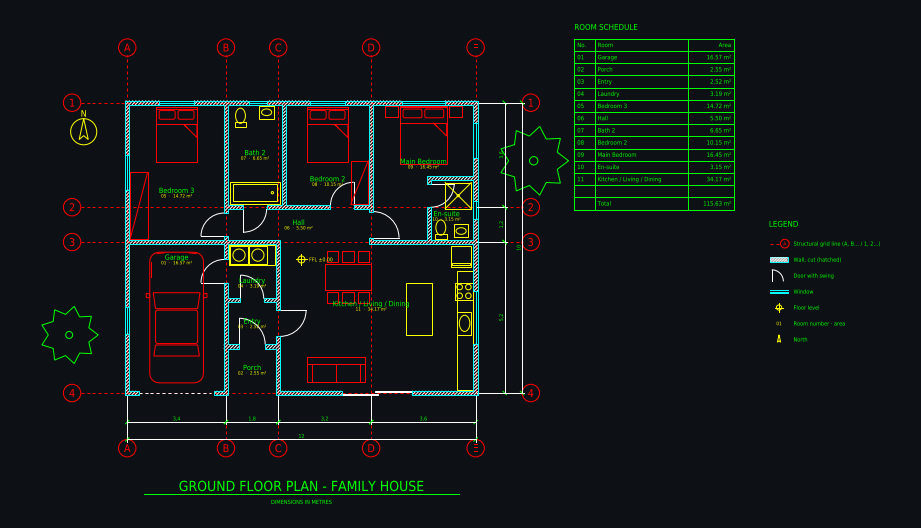
Most AI floor plan generators give you a picture. Plan Chat gives you a CAD drawing: an AI drafter lays out the plan on a structural grid, with wall thicknesses, door swings, windows, furniture, dimension chains, room numbers and areas, a room schedule and a legend, on standard layers. You watch it being drawn, change it by chat or with CAD tools, and download DXF, DWG and PDF.
Some new accounts get their first drawing free while we test it.
How it works
1. Describe or upload
Type the building (rooms, sizes, storeys, plot) or attach a sketch or an image of a plan you want redrawn.
2. Generated live as CAD
The drafter sets the grid and draws walls, openings, fixtures, dimensions and room tags step by step, then checks its own drawing.
3. Iterate, then export
"Make the living room 1 m deeper", "move the garage to the left": each change is a new version you can go back to. Export DXF, DWG or PDF any time.
Real drawings: ai cad floor plan generator in practice
All community drawings → Castle home 14 × 14 m with four round corner towersFrom a written brief · 1 min · DXF
 Shipping container home 12.2 × 7.3 m, 2 bedroomsFrom a written brief · 1 min · DXF
 Family house 12 × 10 m, 3 bedroomsFrom a written brief · 3 min · DXF
 Ground floor 8 × 15 m, drawn from a photo of a planFrom a photo / sketch · 2 min · DXF
Generator plus editor
After the AI is done, the same file is open in a browser CAD editor with snaps, layers and the usual modify commands.
Measured, not guessed
Areas and dimensions are computed from the drawn geometry, so the room schedule always matches the plan.
3D and renders from the same drawing
The 3D model is built from the CAD walls and openings, and you can render any version photorealistically.
What you get
| DXF | Layered, opens in AutoCAD, BricsCAD, DraftSight, LibreCAD, QCAD, Rhino, SketchUp (import) and Revit (link). |
|---|---|
| DWG | AutoCAD 2010 format, so every AutoCAD from 2010 on and most DWG-compatible programs open it. |
| A3 landscape sheet plotted to a true scale (1:50, 1:100 …) with a border and a title block. |
Plus a 3D model built from the same walls and openings, photoreal renders of any version, and every version kept with its own link.
Layers in the drawing
| A-WALL | walls, with A-WALL-PATT for the cut hatch |
|---|---|
| A-DOOR / A-GLAZ | doors with swings, windows |
| A-GRID | structural grid with bubbles (A, B, C … / 1, 2, 3 …) |
| A-ANNO-DIMS | dimension chains, overall and per bay |
| A-ANNO-TEXT | room names, numbers and areas, room schedule |
| A-FURN / A-FLOR-FIXT | furniture, kitchen and bathroom fixtures |
| A-FLOR-STRS / A-SITE / A-PLNT | stairs, site elements, trees |
Tips for the best result
- Give the overall size or the area you aim for; the drafter fits the rooms to it.
- Name must-haves ("en-suite", "pantry next to the kitchen", "stairs in the centre").
- Say metres or feet; the whole drawing, dimensions and areas follow.
- Start broad, then refine with short change requests.
Questions
Is there an AI that generates CAD floor plans?
Yes. Plan Chat generates a floor plan as a real CAD drawing (layered DXF and DWG) from a description or a sketch, with walls, doors, windows, dimensions, room areas and a room schedule, and lets you keep editing it with CAD tools.
What is the best AI generator for AutoCAD floor plans?
For a plan you want to continue in AutoCAD, pick a tool that exports layered DWG or DXF with real entities rather than an image. Plan Chat does that, draws live so you can follow every step, and includes a browser CAD editor. Comparison with Maket, Drafted, Planner 5D and others: https://floorplan.ai-architectures.com/best-ai-floor-plan-generator
Can the AI change the plan after it is drawn?
Yes. Describe the change in a sentence and the drafter edits the drawing; untouched parts stay where they are. Every change is a version with its own link, and undo or restore is free.
Which buildings can it draw?
Houses, apartments, ADUs, cabins and other single floors of residential and small commercial buildings. Draw multi-storey buildings floor by floor.
Are the plans ready for a permit?
No. They are AI concept drawings and can contain mistakes. Have a licensed architect or engineer check and complete the plan before building or applying for a permit.
Try it with your own plan
Drawings, changes and renders use credits from an AI Architectures plan, from $12 a month; DXF, DWG and PDF downloads are included. See pricing.
Open the CAD studioMore ways to use Plan Chat
- Sketch to CAD: turn a hand-drawn floor plan into a DXF / DWG with AI
- Floor plan image to DXF: convert a JPG, PNG or photo of a plan to CAD
- Convert a floor plan to DWG for AutoCAD with AI (from an image, sketch or description)
- Text to CAD floor plan: describe a building, get a DXF drawing
- 2D floor plan maker with AI: dimensioned 2D plans as CAD (DXF, DWG, PDF)
- Start from a measured house plan (ADU, ranch, farmhouse, two-story)
- Desktop app for Windows, Mac and Linux
AI concept drawings can contain mistakes: check dimensions and have a licensed architect or engineer review a plan before you build or apply for a permit. Plan Chat is part of AI Architectures by 20Vision: 500,000+ hours of drafting, modelling & rendering saved, 280 years of full-time work our users got back, across 80,000+ designs.