2D floor plans with real dimensions, drawn by AI
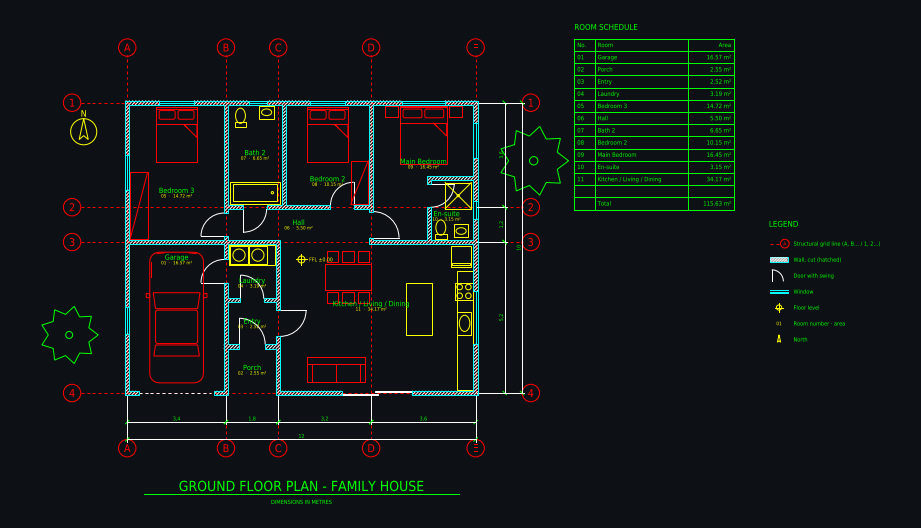
A good 2D floor plan has wall thicknesses, door swings, windows, dimension chains, room names and areas, and prints to scale. Plan Chat draws exactly that from a description or a sketch, as a CAD drawing you can edit, and exports it as DXF, DWG or a PDF sheet with a title block. The 3D view is built from the same 2D plan.
Some new accounts get their first drawing free while we test it.
How it works
1. Describe or sketch it
Type the rooms and sizes, or attach a sketch, a photo or a screenshot of an existing plan.
2. Watch the 2D plan appear
Grid, walls, doors, windows, furniture, dimensions and room tags are drawn one after another.
3. Print or export
Download a PDF on A3 at 1:50 or 1:100, or a DXF / DWG for further work.
Real drawings: 2d floor plan in practice
All community drawings → Castle home 14 × 14 m with four round corner towersFrom a written brief · 1 min · DXF
 Shipping container home 12.2 × 7.3 m, 2 bedroomsFrom a written brief · 1 min · DXF
 Family house 12 × 10 m, 3 bedroomsFrom a written brief · 3 min · DXF
 Ground floor 8 × 15 m, drawn from a photo of a planFrom a photo / sketch · 2 min · DXF
Architectural conventions
Hatched cut walls, door swings, window symbols, grid bubbles, north arrow and a legend, the way an architect’s plan looks.
Dimensions you can trust
Overall and per-bay dimension chains and room areas are measured from the drawing itself.
Black on white for print
The PDF sheet is plotted black on white to a true scale with project, drawing, scale, date and version in the title block.
What you get
| DXF | Layered, opens in AutoCAD, BricsCAD, DraftSight, LibreCAD, QCAD, Rhino, SketchUp (import) and Revit (link). |
|---|---|
| DWG | AutoCAD 2010 format, so every AutoCAD from 2010 on and most DWG-compatible programs open it. |
| A3 landscape sheet plotted to a true scale (1:50, 1:100 …) with a border and a title block. |
Plus a 3D model built from the same walls and openings, photoreal renders of any version, and every version kept with its own link.
Layers in the drawing
| A-WALL | walls, with A-WALL-PATT for the cut hatch |
|---|---|
| A-DOOR / A-GLAZ | doors with swings, windows |
| A-GRID | structural grid with bubbles (A, B, C … / 1, 2, 3 …) |
| A-ANNO-DIMS | dimension chains, overall and per bay |
| A-ANNO-TEXT | room names, numbers and areas, room schedule |
| A-FURN / A-FLOR-FIXT | furniture, kitchen and bathroom fixtures |
| A-FLOR-STRS / A-SITE / A-PLNT | stairs, site elements, trees |
Tips for the best result
- For an existing home, a photo of the plan is the fastest start.
- For a new design, give the total area and the room list.
- Ask for furniture to be added or removed depending on what the plan is for.
- Choose metres or feet before you start.
Questions
How do I make a 2D floor plan with dimensions?
Describe the space or upload a sketch in Plan Chat. An AI drafter draws a 2D floor plan with wall thicknesses, doors, windows, dimension chains, room names and areas, which you download as PDF, DXF or DWG.
Can AI draw a 2D house plan?
Yes. Plan Chat draws 2D house plans as CAD drawings from a written brief or a sketch, and you can change them by chat or with the built-in CAD tools.
Can I print the plan to scale?
Yes. The PDF is an A3 landscape sheet plotted to a true architectural scale (such as 1:50 or 1:100) with a border and title block.
Can I see the 2D plan in 3D?
Yes. The 3D model is built from the CAD walls, doors and windows of the same drawing, so it always matches the plan, including your manual edits.
Is there a free 2D floor plan maker?
Some new accounts can try their first drawing free while the drafter is in testing; downloading its files needs a plan (from $12 a month). Ready-made house plans with free PDF and DXF downloads are at https://floorplan.ai-architectures.com/house-plans.
Try it with your own plan
Drawings, changes and renders use credits from an AI Architectures plan, from $12 a month; DXF, DWG and PDF downloads are included. See pricing.
Open the CAD studioMore ways to use Plan Chat
- Sketch to CAD: turn a hand-drawn floor plan into a DXF / DWG with AI
- Floor plan image to DXF: convert a JPG, PNG or photo of a plan to CAD
- Convert a floor plan to DWG for AutoCAD with AI (from an image, sketch or description)
- AI CAD floor plan generator: dimensioned floor plans in DXF and DWG
- Text to CAD floor plan: describe a building, get a DXF drawing
- Start from a measured house plan (ADU, ranch, farmhouse, two-story)
- Desktop app for Windows, Mac and Linux
AI concept drawings can contain mistakes: check dimensions and have a licensed architect or engineer review a plan before you build or apply for a permit. Plan Chat is part of AI Architectures by 20Vision: 500,000+ hours of drafting, modelling & rendering saved, 280 years of full-time work our users got back, across 80,000+ designs.