Floor plan image to DXF, redrawn by an AI drafter
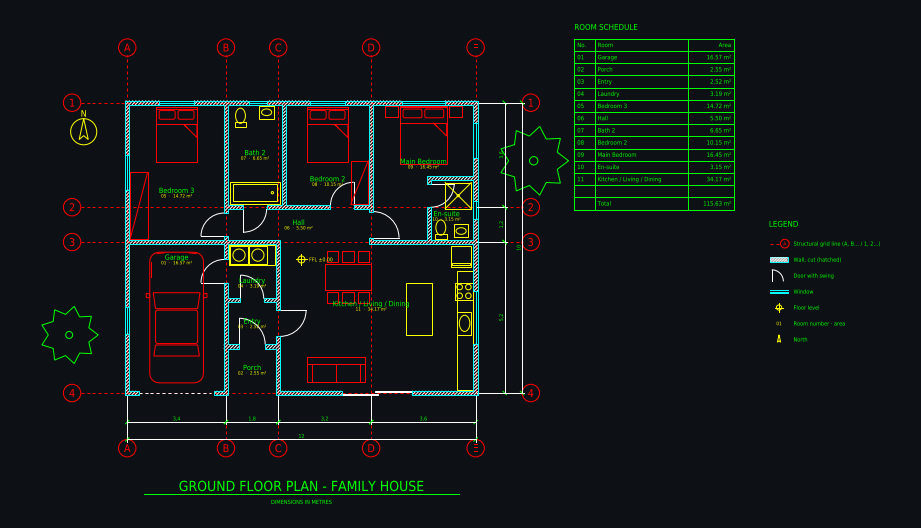
Have a floor plan only as a picture: a scan, a screenshot from a listing, a photo of a printed plan or a JPG from a builder? Plan Chat redraws it as a proper DXF: closed walls with thickness on their own layer, real door and window blocks, dimension chains and room tags with areas. You get CAD geometry you can edit, not a bitmap trace.
Some new accounts get their first drawing free while we test it.
How it works
1. Upload the image
JPG, PNG, WebP or HEIC, a screenshot or a phone photo of a printed plan. For a PDF plan, take a screenshot of the page or export it as an image.
2. The drafter redraws it
It reads the dimensions printed on the plan, sets up the grid and redraws walls, openings, fixtures and labels, then compares its drawing with your image and fixes what differs.
3. Download the DXF
Layered DXF in metres or feet and inches, plus DWG and a scaled PDF sheet. Keep editing in the browser or in your own CAD program.
Real drawings: image to dxf in practice
All community drawings → Ground floor 8 × 15 m, drawn from a photo of a planFrom a photo / sketch · 2 min · DXF
 Castle home 14 × 14 m with four round corner towersFrom a written brief · 1 min · DXF
 Shipping container home 12.2 × 7.3 m, 2 bedroomsFrom a written brief · 1 min · DXF
 Family house 12 × 10 m, 3 bedroomsFrom a written brief · 3 min · DXF
Redrawn, not vectorised
Raster-to-vector tools trace every pixel into thousands of broken lines. The drafter draws each wall, door and window once, the way a person at a CAD station would.
Clean layers
Walls, doors, windows, grid, dimensions, text and furniture each sit on their own layer (A-WALL, A-DOOR, A-GLAZ, A-ANNO-DIMS …), ready for your own templates.
Checks itself
After drawing, it renders the DXF, lays it next to your image and corrects missing rooms, wrong door sides and overlapping labels.
What you get
| DXF | Layered, opens in AutoCAD, BricsCAD, DraftSight, LibreCAD, QCAD, Rhino, SketchUp (import) and Revit (link). |
|---|---|
| DWG | AutoCAD 2010 format, so every AutoCAD from 2010 on and most DWG-compatible programs open it. |
| A3 landscape sheet plotted to a true scale (1:50, 1:100 …) with a border and a title block. |
Plus a 3D model built from the same walls and openings, photoreal renders of any version, and every version kept with its own link.
Layers in the drawing
| A-WALL | walls, with A-WALL-PATT for the cut hatch |
|---|---|
| A-DOOR / A-GLAZ | doors with swings, windows |
| A-GRID | structural grid with bubbles (A, B, C … / 1, 2, 3 …) |
| A-ANNO-DIMS | dimension chains, overall and per bay |
| A-ANNO-TEXT | room names, numbers and areas, room schedule |
| A-FURN / A-FLOR-FIXT | furniture, kitchen and bathroom fixtures |
| A-FLOR-STRS / A-SITE / A-PLNT | stairs, site elements, trees |
Tips for the best result
- The sharper the image, the better: crop to the plan, avoid shadows and steep angles.
- Printed dimensions are read and used; tell it the unit if the plan does not say.
- Listing floor plans without dimensions: give the overall width or one room size.
- Several floors on one sheet: ask for one floor per drawing.
Questions
How do I convert a floor plan image to DXF?
Upload the image to Plan Chat. An AI drafter redraws it as a layered CAD drawing with walls, doors, windows, dimensions and room areas, and you download the result as DXF, DWG or PDF.
Can I convert a JPG floor plan to CAD for free?
Some new accounts can try their first drawing free while the drafter is being tested (you see it in the studio; its DXF, DWG and PDF files come with any plan). With a paid plan (from $12 a month) a drawing from an image usually costs 700 to 1,800 credits, and the DXF, DWG and PDF downloads are included.
Is this the same as a raster to vector converter?
No. A converter traces pixels and gives you thousands of short segments. Plan Chat redraws the plan with proper entities: closed wall outlines, door and window blocks, dimensions and text on named layers.
Can it convert a PDF floor plan?
Upload the plan as an image: take a screenshot of the PDF page or export the page as PNG or JPG. Vector PDFs that already contain CAD lines are better opened directly in your CAD program.
Which units does the DXF use?
Metres (with metric dimensions and m² areas) or feet and inches (the DXF is in inches with feet-inch dimensions and sq ft areas). Say which one you want in your message.
Try it with your own plan
Drawings, changes and renders use credits from an AI Architectures plan, from $12 a month; DXF, DWG and PDF downloads are included. See pricing.
Open the CAD studioMore ways to use Plan Chat
- Sketch to CAD: turn a hand-drawn floor plan into a DXF / DWG with AI
- Convert a floor plan to DWG for AutoCAD with AI (from an image, sketch or description)
- AI CAD floor plan generator: dimensioned floor plans in DXF and DWG
- Text to CAD floor plan: describe a building, get a DXF drawing
- 2D floor plan maker with AI: dimensioned 2D plans as CAD (DXF, DWG, PDF)
- Start from a measured house plan (ADU, ranch, farmhouse, two-story)
- Desktop app for Windows, Mac and Linux
AI concept drawings can contain mistakes: check dimensions and have a licensed architect or engineer review a plan before you build or apply for a permit. Plan Chat is part of AI Architectures by 20Vision: 500,000+ hours of drafting, modelling & rendering saved, 280 years of full-time work our users got back, across 80,000+ designs.