Image to DWG: a JPG or PNG floor plan, redrawn for AutoCAD
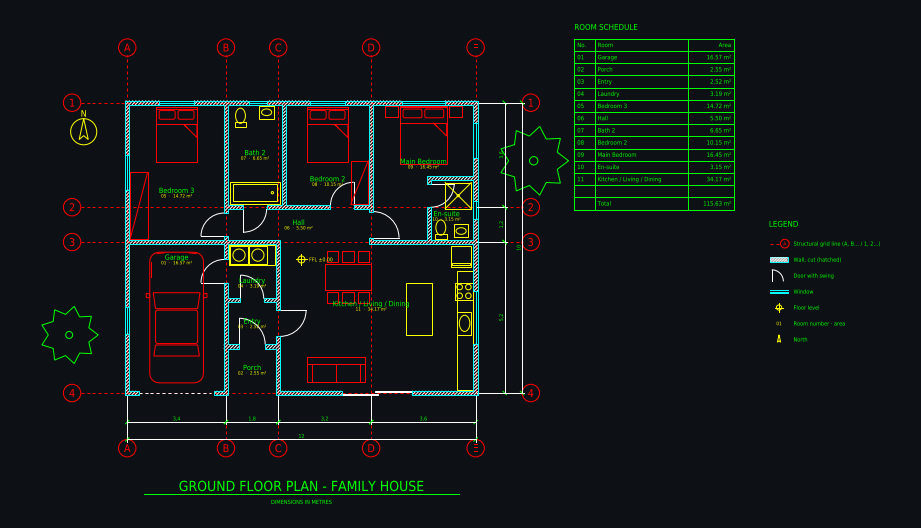
JPG to DWG converters trace the pixels of an image, so a floor plan comes out as noise you cannot dimension or edit. Plan Chat redraws the plan: an AI drafter reads the image, draws walls with thickness, doors and windows, dimension chains and room tags, and saves a DWG (AutoCAD 2010) with clean layers, plus a DXF and a PDF sheet.
Some new accounts get their first drawing free while we test it.
How it works
1. Upload the image
JPG, PNG, WebP, HEIC, a screenshot from a listing or a photo of a printed plan. PDFs work too.
2. AI redraws it as CAD
Grid, walls, openings, fixtures, dimensions and room tags are drawn live and checked against your image.
3. Open the DWG in AutoCAD
Units are set in the file, so it comes in at the right scale. Layers follow the A-WALL / A-DOOR / A-ANNO naming.
Real drawings: image to dwg in practice
All community drawings → Hand sketch to CAD: ground floor with winter gardenFrom a photo / sketch · 1 min · DXF
 Ground floor 8 × 15 m, drawn from a photo of a planFrom a photo / sketch · 2 min · DXF
 L-shaped backyard cottage (ADU) 10 × 9 m: 2 bedrooms, covered patioFrom a written brief · 1 min · DXF
 Narrow townhouse on a 5 m wide lot: 3 bedrooms, 2 courtyardsFrom a written brief · 1 min · DXF
 Guitar-shaped house, 26 m long, with music studio in the headstockFrom a written brief · 2 min · DXF
 Honeycomb house: seven hexagonal rooms, 5 m eachFrom a written brief · 1 min · DXF
Editable from the first minute
Every wall, door and dimension is an entity you can move, stretch or delete, not part of a traced bitmap.
Listing images without dimensions
Give the overall width or one room size and the drafter scales the plan from it, then tells you what it assumed.
DWG, DXF and PDF
The same drawing as DWG for AutoCAD, DXF for every other CAD program and a PDF sheet to print at scale.
What you get
| DXF | Layered, opens in AutoCAD, BricsCAD, DraftSight, LibreCAD, QCAD, Rhino, SketchUp (import) and Revit (link). |
|---|---|
| DWG | AutoCAD 2010 format, so every AutoCAD from 2010 on and most DWG-compatible programs open it. |
| A3 landscape sheet plotted to a true scale (1:50, 1:100 …) with a border and a title block. |
Plus a 3D model built from the same walls and openings, photoreal renders of any version, and every version kept with its own link.
Layers in the drawing
| A-WALL | walls, with A-WALL-PATT for the cut hatch |
|---|---|
| A-DOOR / A-GLAZ | doors with swings, windows |
| A-GRID | structural grid with bubbles (A, B, C … / 1, 2, 3 …) |
| A-ANNO-DIMS | dimension chains, overall and per bay |
| A-ANNO-TEXT | room names, numbers and areas, room schedule |
| A-FURN / A-FLOR-FIXT | furniture, kitchen and bathroom fixtures |
| A-FLOR-STRS / A-SITE / A-PLNT | stairs, site elements, trees |
Tips for the best result
- Use the largest version of the image you have; crop away the margins.
- Straight-on images work best; correct strong perspective before uploading.
- Tell it metres or feet and inches.
- For logos, icons or artwork, use a graphics vectoriser instead: this tool draws floor plans.
Questions
How do I convert a JPG floor plan to DWG?
Upload the JPG to the Plan Chat studio. The AI drafter redraws the floor plan as a CAD drawing with layers, dimensions and room areas, and you download it as DWG for AutoCAD, as DXF or as a PDF sheet.
Can I convert a PNG to DWG for free?
Free online converters trace the pixels and give you unusable lines for a floor plan. The redraw here is paid: a drawing usually uses 700 to 1,800 credits from a plan starting at $12 a month, with the DWG, DXF and PDF included.
Which AutoCAD versions open the DWG?
It is saved in AutoCAD 2010 format, which AutoCAD 2010 and every later version open, as do BricsCAD, DraftSight, ZWCAD and most DWG-compatible programs.
Does it work with photos of a plan?
Yes, as long as the plan is readable: shoot from straight above in good light. A screenshot or scan works better than a photo at an angle.
Can I convert other images, like logos, to DWG?
No. The drafter is built to draw architectural floor plans. For artwork or logos use a graphics vectoriser.
Try it with your own plan
Drawings, changes and renders use credits from an AI Architectures plan, from $12 a month; DXF, DWG and PDF downloads are included. See pricing.
Open the CAD studioMore ways to use Plan Chat
- Sketch to CAD: turn a hand-drawn floor plan into a DXF / DWG with AI
- Floor plan image to DXF: convert a JPG, PNG or photo of a plan to CAD
- Convert a floor plan to DWG for AutoCAD with AI (from an image, sketch or description)
- AI CAD floor plan generator: dimensioned floor plans in DXF and DWG
- AI construction drawings: floor plans as DWG, DXF and PDF from a sketch, photo or PDF
- AI blueprint generator: house blueprints as real CAD from text, a sketch or an image
- Blueprint maker: draw house blueprints online with AI (DWG, DXF, PDF)
- Blueprint of my house: how to find it, or redraw it from a photo or sketch with AI
- Text to CAD floor plan: describe a building, get a DXF drawing
- 2D floor plan maker with AI: dimensioned 2D plans as CAD (DXF, DWG, PDF)
- PDF to DWG with AI: convert a PDF floor plan to a layered AutoCAD drawing
- Scan to CAD: convert scanned floor plans and paper drawings to DWG / DXF with AI
- AutoCAD AI: an AI drafter that draws floor plans for AutoCAD (DWG)
- AI drafting software for floor plans: an AI CAD drafter (DWG, DXF, PDF)
- As-built floor plans from a field sketch: measured sketch to CAD (DWG, DXF, PDF)
- Home addition design with AI: plan the addition on your existing floor plan (DWG, PDF)
- ADU design with AI: a custom ADU floor plan for your lot, drawn as CAD (PDF, DWG)
- Start from a measured house plan (ADU, ranch, farmhouse, two-story)
- Desktop app for Windows, Mac and Linux
AI concept drawings can contain mistakes: check dimensions and have a licensed architect or engineer review a plan before you build or apply for a permit. Plan Chat is part of AI Architectures by 20Vision: 500,000+ hours of drafting, modelling & rendering saved, 280 years of full-time work our users got back, across 80,000+ designs.